

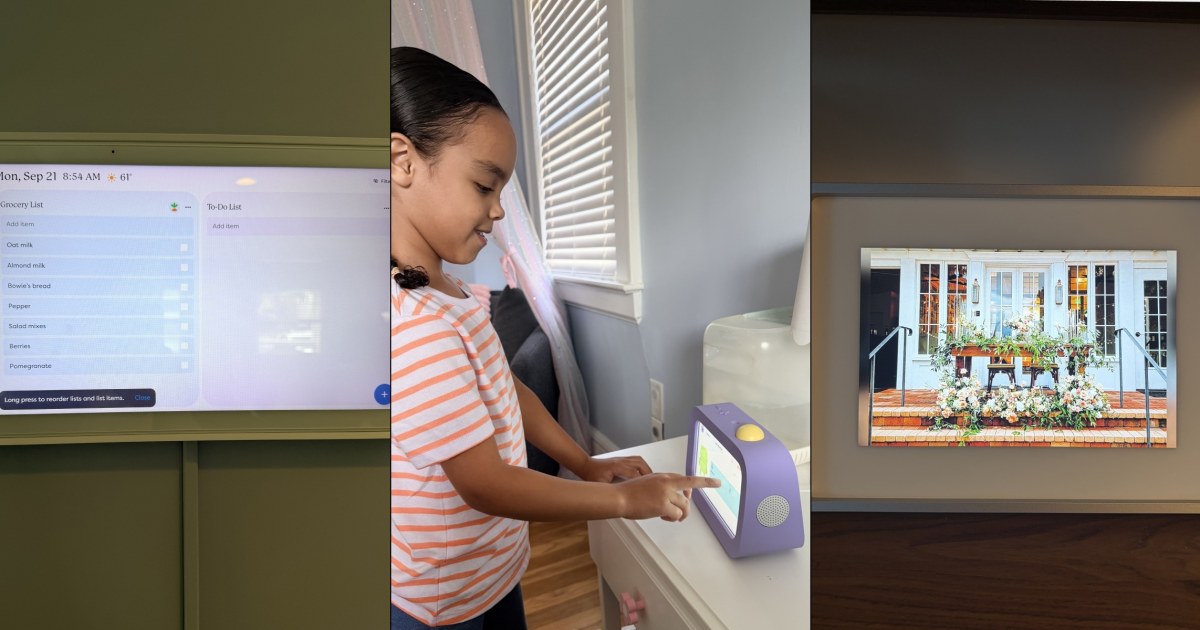
Over the past few years, Skylight has carved out a reputation for helping people bring a little more order and ease into their daily life. The brand’s first product, the Skylight Frame, launched in 2015 to help people get photos out of people’s phones and on display in their homes. Since then, the brand launched a digital calendar and a routine-building alarm clock for kids, both of which aim to help households run more smoothly. Moms in particular rave about how their products alleviate the mental load of having to remember to do things like send grandparents photos, schedule appointments and sign kids up for extracurricular activities.
But with products costing upwards of $160, is this brand worth the hype (and price tag)? Over the years, I have tested everything Skylight has to offer, as have a few other NBC Selected editors (and some former editors). Keep reading to get all the details on what we really think.
Want more from NBC Selected? Sign up for our newsletter, The Selection, and shop smarter.
Our honest review of Skylight

This is the updated version of the product that put Skylight on the map (though the original is also still available). The upgraded version has an HD anti-glare touchscreen that allows you to pinch, crop and zoom, swappable magnetic frames and 16GB of storage, which gives you room for up to 16,000 photos. “It’s simple to set up — I’m confident almost anyone could do it with little issue,” says former NBC Selected reporter Harry Rabinowitz, who tested the frame extensively. After receiving the device, you just plug it in, connect to WiFi and create a unique Skylight email address. From there, friends and family can send photos instantly by email or through the free Skylight app, and they’ll appear on the frame within seconds.

I purchased this frame for my parents last Christmas because my mom was constantly asking me to send her pics of my two kids, and I found this to be a much easier way of sharing what was going on in their lives. I love that Skylight lets you set up the frame and preload it with photos before gifting it, so it’s ready to go the moment your recipient plugs it in.
The frame also offers a degree of personalization and versatility. The magnetic frames let you swap styles in seconds (simply clip it on the top edges around the screen); you can choose from real hardwood, aluminum or classic colored finishes to match any room’s decor.

As a mom of two, I can tell you that there’s a particular kind of chaos that comes with juggling school pickups, sports practices, work meetings, doctor appointments and more for four different people. Which is why, when a fellow working mom told me that the Skylight Calendar had alleviated her mental load, I was intrigued. The WiFi-enabled calendar is intended to serve as a family’s organizational hub.
One of the features that won me over quickly was the color-coding system. Every family member gets assigned their own color, so at a glance you can tell whose dentist appointment is Tuesday and whose dance practice runs late on Thursday, without squinting at tiny text or scrolling through a shared app. You can also color-code by activity type instead of person, which is handy if you’d rather see all your work commitments in one color and all the kids’ school events in another. Either way, the effect is the same: a wall calendar that actually reads clearly from across the room, instead of one big wall of black text. Another function I love? You don’t have to manually enter everything. You can take photos of events or flyers and email them (or use the app to upload them) straight to your calendar to be automatically input.

The calendar also doubles as a running grocery list and chore chart, which cuts down on two more apps I used to juggle. Anyone in the family can add items to the shared grocery list right from the screen (or a companion app), so it updates in real time instead of relying on someone remembering to text the last person heading to the store. The chore chart works similarly: you can assign tasks to specific kids, set them to repeat daily or weekly, and let your kids check things off themselves, which can cut down on the, “did you do your chores?” back-and-forth happening in so many households. Worth noting: the core calendar, chore chart and lists all work right out of the box with no subscription needed. If you want extras like meal planning, the photo/video screensaver or chore rewards, though, you’ll need to pay for Skylight Plus, which runs for about $79 a year.
If your household has ample real estate to see everyone’s schedule at once, there’s also the Skylight Calendar Max, a 27-inch version built exclusively for wall mounting. It has all the same core features as the standard Calendar, including the color-coding, chore charts, grocery lists and photo import, just on a much bigger display, which makes it a better fit for larger families or anyone who wants their calendar visible from across the room rather than up close.

Buddy is Skylight’s latest release and its goal is getting kids through mornings and bedtimes without a parent repeating the same instructions five times. In other words, it’s my favorite new device. The screen allows your kid to see their routine laid out step by step — get dressed, brush teeth, get in bed — and tap a button after each one, earning stars and a small on-screen celebration for finishing. It’s a deliberately limited device: no apps, no browser, no way to drift into unrelated screen time once the routine is done, which is part of what makes it easy to hand to a young kid without hesitation. Parents set everything up and manage it remotely through the same app used for the Skylight Calendar.
My 5-year-old daughter has been using Buddy for three months now, and I’ve been amazed by how much it helps her stick to a routine and feel confident about going about her day. She doesn’t need me hovering or repeating myself, she just checks the screen and knows what’s next, which has made our mornings noticeably calmer. Beyond the routines, Buddy also lets kids earn rewards for completing tasks consistently, which parents can customize to fit whatever motivates their own child. For example, every time my daughter makes her bed and checks off the task on her Buddy, she gets a digital star. Once she has 20 stars, I’ve set it up so the Buddy lets her know she’s completed a goal and I take her out for ice cream. For families juggling multiple kids or hectic schedules, it’s a small addition that’s made a surprisingly big difference.

What can improve
After spending time testing Skylight’s lineup, a few things stood out as room for growth:
- Subscription gating: Across all three products, some genuinely useful features (video playback and albums on the Frame, rewards and nudges on Buddy, some list features on the Calendar) sit behind a paid plan rather than being included with the hardware purchase.
- Price of entry: Between the Calendar, a Frame for the grandparents and a Buddy for each kid, outfitting a whole household in Skylight products adds up quickly compared to using a shared family calendar app or a single all-purpose smart display.
How I tested Skylight
To find out how Skylight’s devices hold up beyond first impressions, I made them part of my everyday routine and pushed them the way a busy household would.
- Real-life scenarios: I used them in everyday situations rather than staged demos, stress testing how they performed when it counted.
- Every available feature: I tried each feature on offer, not just the headline ones, to see which ones were actually useful.
- Daily interaction: I used them every day to make sure they stayed practical once the novelty wore off.
Who is Skylight for?
Skylight is for anyone who wants to simplify basic tasks and help their lives run a bit more smoothly. Their products are particularly good for families who may be tight on time or who need help staying organized. Each product in the brand’s bestselling lineup has a unique purpose: The calendar is great for anyone juggling multiple calendars, while the Frame is helpful for those who take a lot of photos or want to share them with loved ones. Finally, the Buddy is perfect for a kid who is learning to be more independent and needs help sticking to routines.
If you are on a budget and looking for most budget-friendly alternatives, Amazon has a number of options — but keep in mind you won’t get all the same features with the lower-priced alternatives. For example, the Max Angel Digital Frame ($69.99) displays photos similar to Skylight’s frame but you can’t zoom in. And the Dragon Touch Digital Calendar ($79.99) is much smaller than the Skylight Calendar 2 and is best for families looking for simple calendar keeping without all the other features.
Why trust NBC Selected?
I am a commerce editor at NBC Selected and a journalist who regularly covers wellness, beauty, home and lifestyle. I have written about honey skin care, the Jellycat craze and more. I have been using a Skylight calendar in my home for over a year and recently got my 5-year-old daughter the Buddy.
Catch up on NBC Selected’s in-depth coverage of tech and tools, wellness and more, and follow us on Facebook, Instagram, X and TikTok to stay up to date.










Leave a Reply