

As Americans are living longer than ever, seniors are increasingly prioritizing aging in place, which means to live safely, comfortably and independently in their home and community for as long as possible. “It’s about maintaining routines, dignity and connection to the people and places that are familiar to them,” says Dr. Lakelyn Eichenberger, a gerontologist and caregiving advocate at Home Instead. “But doing so successfully often requires thoughtful planning, support systems, and proactive safety measures.” Tech that solves seniors’ problems and fits seamlessly into their lives can help. Smart devices, health-monitoring wearables, medication dispensers and more often empower them to live independently, and give their loved ones peace of mind.
I talked with experts about the best tech to help seniors maintain independence and curated a list of gadgets that align with their recommendations. If you’re a caretaker, I’m also sharing tips for how caretakers can help loved ones incorporate these devices into their lives.
Want more from NBC Select? Sign up for our newsletter, The Selection, and shop smarter.
The best tech for seniors who want to maintain independence
To recommend the best tech that helps seniors maintain independence, I found highly-rated options that align with expert guidance (read more about that here), many of which the NBC Select staff has tested. It’s important to note that “technology can support independence in meaningful ways, but only if it’s accessible, powered on and easy to use,” says Eichenberger. I included a handful of tips about how to incorporate this tech into your life and how caregivers can help below.
Additionally, while these gadgets are helpful, other home modifications may be necessary so you can age in place safely and comfortably. Dr. Zeeshan Khan, the chief of geriatric medicine at Hackensack Meridian Jersey Shore University Medical Center, recommends getting a professional home safety assessment done to cover all your bases.
Best smart medication dispenser


Medication errors, like missing doses and taking the wrong pill at the wrong time, are a leading cause of hospitalizations in seniors, says Khan. Using an automated pill dispenser and reminder system like Mobi’s is one of the best ways to reduce the chance of mistakes. It has enough compartments to plan out up to 28 days of medication, and when it’s time to take your pills, an alarm sounds and a light flashes to alert you. If you connect the device to Mobi’s app, which caregivers can get access to as well, a notification pops up on your phone or tablet. When it’s time, the device automatically rotates to the right compartment, only opening enough for you to remove the pills you’re scheduled to take.
This dispenser comes with rotating trays and customizable dose rings. You can use its touchscreen or app to program medication schedules and adjust alert settings. The dispenser detects when you take medication out of a compartment, which the app keeps a log of, and it has a backup battery — even if your power goes out while the Mobi is plugged in, you’ll be able to use it. The UV-resistant lid also has a built-in key-lock.
Best smart plugs

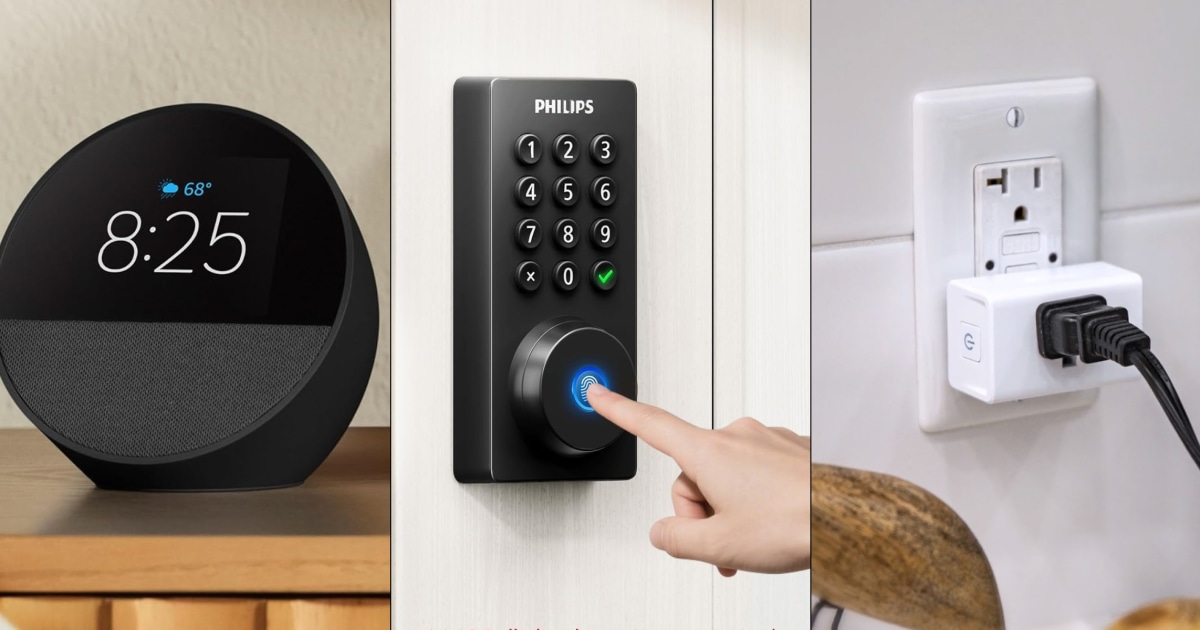
“Smart home devices can help older adults manage daily tasks more easily and safely without needing to navigate stairs or dark rooms,” says Eichenberger. Kasa’s Wi-Fi-enabled smart plugs, which come in a four-pack, are a perfect example — once you connect lamps, fans, small kitchen appliances and other devices to them, you can control them from wherever you are using the brand’s app or voice commands. The app also lets you set up schedules and timers for each device paired with a plug, preventing you from having to remember to turn off your humidifier after it’s been on for hours or turn on the living room lamps when the sun sets, for example. The plugs are compact, too, so they won’t block your second outlet, and you can stack multiple next to each other.
All the experts I spoke to say the most beneficial way for seniors to use smart plugs is with lamps. “Poor lighting is one of the most overlooked issues, and it significantly increases fall risk,” says Israel Cross, a public health gerontologist, an aging and caregiving strategist, and a CallieCare advisor. In addition to being a safety concern, especially as seniors’ vision may change over time, darkness can also lead to confusion, says Eichenberger.
Once you pair a lamp with a smart plug, you can turn it on and off without walking to a switch or encountering hazards like stairs. You can also set schedules, like for lamps to turn on at the same time your morning alarm goes off so your bedroom is bright before getting out of bed. Since the app lets you control your lamps even when you’re not home, you can also make sure the lights are on prior to you walking inside.
Best smart bulbs

If you want to control your lights remotely but don’t want to use a smart plug, or you have high hats in your home, try Govee’s Smart Light Bulbs. Once you pair them with the Govee app, you can turn them on and off from anywhere, set timers and schedules, control them via voice commands and adjust their color and brightness settings. For those who install multiple smart bulbs in their home, the app lets you group specific lights so you can control them all together, as well as individually.
Best at-home voice assistant

Voice assistants help seniors maintain routines by allowing them to set up reminders, alarms and timers hands-free, and get quick answers to questions, says Julie Brown, an AgeTech gerontologist, a certified aging-in-place specialist and a CallieCare advisor. Alexa, Amazon’s voice assistant, is built into the Echo Spot, a highly rated smart alarm clock that has a LED screen, so you get visual and audio cues. You can ask Alexa to create wake-up, bedtime and mealtime alarms; set reminders about tasks, appointments, to-do list items, events and medication; and start timers, like for food in the oven. The virtual assistant will answer questions about almost any topic, including the weather or traffic in your neighborhood. The Echo Spot, which pairs with the Alexa app, also connects to certain smart home devices like smart plugs, lamps and thermostats if you want to control them via voice commands. Plus, it acts as a Bluetooth speaker to stream music, audiobooks and podcasts.
Best smart lock

With this Wi-Fi-enabled, deadbolt smart door lock, you don’t have to worry about forgetting your key or struggling to use one if you have mobility limitations from arthritis, for example. Instead, you can unlock it with your fingerprint, a pin code, voice commands or the Philips app (a key comes with the lock as a backup). The app also lets you lock and unlock your door remotely, and it sends you alerts and keeps an activity log so you always know who’s coming and going. You can create up to 100 one-time, all-time or scheduled passcodes for loved ones and caregivers so they have access in case of emergency. You’re able to set the door to automatically lock within 10 to 180 seconds after you leave, too.
Best hearing assistance device

Devices that boost volume help facilitate stronger social connection among seniors if they’re experiencing hearing loss, says Brown. Beyond using Apple’s AirPods Pro 3 to customize the volume of calls, music and other types of media, you can do a hearing test with them and wear them as hearing aids. First, you do the hearing test, which you access in your iPhone’s settings app under “your AirPods” or the Health app. Once you get your results, you can start using the AirPods as hearing aids — the earbuds use the results of the hearing test to customize sound settings for voices, media and phone calls. You can also manually adjust the earbuds’ volume, frequency, tone, left-right balance and more as needed, and download the results of your Apple hearing test to share them with your doctor. If you recently took a hearing test at a doctor’s office, for example, you can use those to set up the AirPods as hearing aids by uploading a copy.
It’s also important to note that the AirPod’s Pro 3 has built-in sensors that track heart rate and calories burned using the Apple Fitness and other compatible apps. This can help you, your doctor and other caregivers monitor trends during physical activity.
Best health and safety wearable

“Falls are common among older alerts, with about one in three adults over the age of 65 falling each year,” says Khan. “Wearable devices can automatically detect a fall and call for help, leading to faster emergency response.” A smartwatch like the Apple Watch SE 3 is a particularly good option. Not only does it have fall detection, but it also offers remote health monitoring, tracking your activity, sleep, heart rate and blood oxygen level. It has car crash detection, too, and can send you notifications about a low or high heart rate, sleep apnea episodes, irregular heart rhythms via Apple’s ECG app and concerns about fall risk due to a lack of walk steadiness. “These devices have the potential for earlier detection of changes in health and fewer emergency visits,” says Khan. Since all your data gets stored in the Apple Health and Fitness apps, you can easily share it with doctors and other caregivers. Plus, you use the watch to make calls and texts, and it has Siri voice assistant built in.
Best smart home monitor

Home monitoring technology like smart smoke and carbon monoxide detectors can help seniors and families identify risks early, and they add an extra layer of around-the-clock reassurance for everyone, says Eichenberger. Kiddie’s Wi-Fi-enabled, battery-powered detector pairs with the Ring app, which sends you notifications if it detects smoke or carbon monoxide, as well as sounds an alarm inside your home. (No ring devices or subscriptions are required for use.) You can also give loved ones and caregivers access to your detector through the Ring app, so they’ll get notifications if there’s an issue.
Best tablet

“Video-calling devices like tablets and other simplified communication devices can help older adults stay socially connected, which is especially important for combating isolation and loneliness,” says Eichenberger. The Amazon Fire HD 10 Tablet has a built-in camera for video calls and telemedicine visits, and it comes with Alexa voice assistant, letting you set alarms, timers and reminders hands-free, as well as ask questions. You can adjust the tablet’s brightness, text size and other settings according to your preferences, and download apps for reading, listening to music, watching TV and movies, playing games, taking classes, managing smart home devices and more. The Fire HD 10 gives you up to 13 hours of battery life on a single charge, according to the brand.
How I picked the best tech for seniors
Experts recommend thinking about the following when shopping for tech that helps seniors maintain independence, all of which I considered while curating my picks above.
- What problem it’s solving: The most effective tech for seniors solves genuine problems, seamlessly fits into their lives and eliminates (not add to) stress and worry for them and their loved ones, says Cross. He recommends asking three questions before buying tech for yourself or a loved one: Does this actually improve daily life? Does it support independence and quality of life? Is it realistic and easy to use over time? If the answer is yes to all three questions, it’s a useful tool.
- Ease of use: “Choose technology that feels intuitive and accessible,” says Eichenberger. “Features like large buttons, voice activation, simple displays and minimal setup steps can make a big difference.”
- Safety and privacy protections: “Secure passwords, scam alerts and settings designed to help protect seniors from fraud and keep their personal information safe,” says Eichenberger.
- Required apps and devices: Many gadgets require Wi-Fi for you to access their full suite of benefits, or pair with an app on your phone or tablet. Make sure the tech you buy for yourself or a loved one is compatible with your at-home internet setup and existing devices.
Advice for caregivers: How to introduce new technology to seniors
- Be proactive, not reactive: Focus on adding tech and other tools to seniors’ lives before an issue or crisis arises, not after, says Cross. He recommends having ongoing conversations with your loved ones way before they reach their 80s, for example. The sooner you can help them add things to their lives that make it safer and more comfortable to be at home, the better long-term outcomes are.
- Pick tech out together: Don’t force tech on your loved one. Involve them in choosing a device by asking them about what problem they want it to solve, what they want it to add to their life or make it easier, and what concerns they have. Suggest devices from there, and focus on their practical, everyday benefits — don’t get into the weeds, which can cause confusion.
- Talk about gadgets as helping to maintain independence, not replace it: Instead of saying your loved one “needs help,” center conversations about new gadgets around how they’ll help them maintain autonomy, increase their quality of life and thrive at home, says Khan. Seniors also may be more likely to embrace devices if you connect it to something meaningful, like the ability to stay in touch with friends, kids and grandkids.
- Introduce one gadget at a time: “One of the biggest mistakes families make is introducing too much technology too quickly,” says Eichenberger. “It’s important to start small and focus on tools that solve a specific challenge or improve daily life in a meaningful way.”
- Do hands-on demonstrations: When you’re teaching your loved one how to use a new device, it’s best to do so in person. Sit down together, talk through each step and allow them to practice and ask questions in real time, says Brown. Patience is very important here — making someone feel rushed lessens their chances of feeling confident with a product and may cause them to give up on using it. Your loved one might need a few hands-on demonstrations to get the hang of the device, and repetition is key, so encourage them to use it in their everyday life.
- Provide instructions for future reference: Often, when it comes to technology, the biggest barrier seniors face is the confidence to use it, says Khan. After doing a hands-on demonstration and practicing together, leave your loved one with easy-to-read instructions they can refer back to themselves. You can type up directions in a large font and print it out for them, or even make them videos and voice recordings.
- Designate a “tech support” person: “Set expectations early on about who in the family will serve as the go-to ‘tech support’ person,” says Eichenberger. “Having one trusted contact for troubleshooting questions or setup issues can reduce frustration for the older adult.”
- Utilize tech learning programs and groups: If you can’t always be there to help your loved one with their tech, lean on programs and groups that provide support. For example, many local libraries and community centers have tech learning sessions, and the AARP also has a hotline seniors can call with tech questions.
- Create an at-home charging station: If your loved one is relying on a rechargeable device, help them create a dedicated charging station with all the supplies they’ll need. Also, suggest that they create a daily habit around plugging their devices in, like before they go to bed, for example.
- Reevaluate needs over time: Your loved one’s needs will change over time, so flexibility and consistent check-ins are crucial. Cross recommends constantly checking in to learn about what is and isn’t working for your loved one, and whether their current living situation is becoming unsafe or unsustainable.
Meet our experts
At NBC Select, we work with experts who have specialized knowledge and authority based on relevant training and/or experience. We also ensure that all expert advice and recommendations are made independently and with no undisclosed financial conflicts of interest.
- Dr. Zeeshan Khan is the chief of geriatric medicine at Hackensack Meridian Jersey Shore University Medical Center.
- Dr. Lakelyn Eichenberger is a gerontologist and caregiving advocate at Home Instead.
- Julie Brown is an AgeTech gerontologist, a certified aging in place specialist and a CallieCare advisor.
- Israel Cross is a public health gerontologist, an aging and caregiving strategist, and a CallieCare advisor.
Why trust NBC Select?
I’m a reporter at NBC Select who covers various topics, including health, wellness and fitness. For this article, I interviewed four experts about the best tech to help seniors maintain independence, and recommended products based on their guidance. I also shared information about tech for seniors in a related NBC News NOW broadcast segment.
Catch up on NBC Select’s in-depth coverage of tech and tools, wellness and more, and follow us on Facebook, Instagram, Twitter and TikTok to stay up to date.












Leave a Reply